

Build a whole-project budget
Bring the property price, buying costs, renovation work, living costs and contingency into one figure, then check it against the money in your plan.
What the whole-project budget covers
The asking price is only one part of what a property costs you. A whole-project budget adds the buying costs, the work, the costs of living somewhere else while the work happens, and a contingency for surprises. Costs & spending in Mekozo brings those together into one figure, Whole project so far, and sets it against Money in your plan, so you can see whether the plan adds up before you commit.
While you are still looking, the same picture appears per property in its Offer Checker and in comparisons. Once you are buying or own the home, it lives on Costs & spending.
Step by step
- Open Costs & spending (called Costs & affordability while you are looking). Choose Add the property price if it is not there yet.
- Record what buying will cost you: taxes, fees and surveys. In a home you own, open Buying costs under Project setup; while you are buying, use Buying; while you are looking, use Buying costs for this property in each property's Offer Checker. Add what you know and leave the rest as not known yet.
- Open Renovation budget and set the amount you want to spend on the work. Add a contingency as a fixed amount or a percentage. Contingency is money set aside inside your plan, not extra money on top of it.
- Add the work. Use + Add, then Work, for each job. A rough estimate is fine to start; you can replace it with quotes later. Anything with no figure yet shows as Not priced yet, never as zero.
- Under Living costs while the work happens, answer whether someone will need to stay elsewhere, then choose Add living costs for rent, storage, travel or anything else the work causes.
- Under How you're funding it, choose Add funding for each source of money, such as your own money or a family contribution. Say whether each one is confirmed and when it will be available.
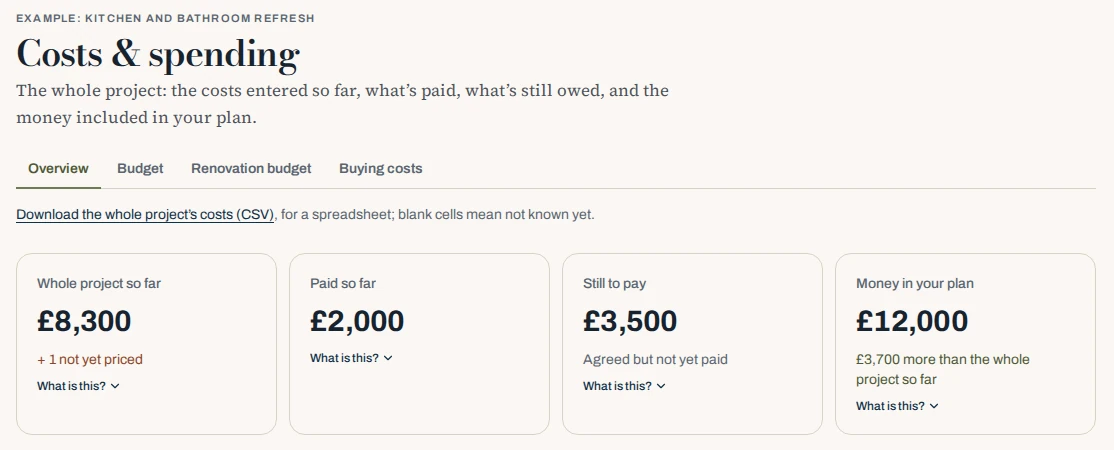
- Read the four cards at the top: Whole project so far, Paid so far, Still to pay and Money in your plan. The line under Money in your plan tells you how much more or less it is than the whole project so far.
Reading the result
Whole project so far adds up everything you have entered. If some work is not priced, the card says so, for example "+ 1 not yet priced", so you know the real figure is higher. If part of your money is not confirmed, Mekozo shows how the picture looks with confirmed money only.
Choose What is this? under any card to see how it is worked out. To work in a spreadsheet, use Download the whole project's costs (CSV); blank cells mean not known yet.
Common mistakes
- Leaving buying costs out. Taxes, legal fees and surveys can add a large sum. Record them even as rough figures.
- Counting contingency as spare money. It is there for surprises in the work. Give it a job and leave it alone.
- Entering a guess as zero. Leave an unknown amount blank so it shows as not priced, rather than making the total look smaller.
- Forgetting the time in between. If you cannot live in the home during the work, rent and storage belong in the budget.
- Counting money that is not yet confirmed. Mark each funding source honestly so you can see the gap if it falls through.
For the full list of costs to plan for, read Costs of buying a house: the full list, hidden ones too.
Questions people ask
Do I need exact figures to start?
No. Rough figures are enough to see the shape of the project. Replace them with quotes and agreed prices as you get them.
Can Mekozo tell me what my buying costs will be?
It can suggest the kinds of cost to expect based on where the property is, but it does not give tax or legal advice. Confirm the amounts with a qualified adviser.
Can I ask about a figure I do not understand?
Yes. Use Ask Mekozo to explain a figure or test a what-if. Its answers are rough planning help and can be wrong, so check anything important.
Bring the whole picture home.
Budgets, quotes, payments, documents and decisions in one place
30 days free. No card needed.
Monthly, with no annual plan. The Terms of membership set out the details.