

Compare properties without losing your priorities
Build your brief once, add each property you are considering, then compare them side by side against the same must-haves, money and viewing notes.
What the property comparison shows
When you are house hunting, the property you saw last often feels like the best one. Compare properties in Mekozo puts two or more homes side by side and checks each one against the same Property Brief: what you must have, what is important, what would be nice and what you don't want. You see how well each home fits, what is still unknown and what each one would cost, in one view.
You will find it in a search project, under Properties I'm considering.
Before you start
You need a search project. If you have not made one yet, create a project and choose Find the right property. One search project can hold every home you are looking at, so keep them together rather than making a project for each.
Step by step
- Open What I'm looking for and choose Build my brief. Tick what applies and give each item a priority: Must have, Important, Nice to have or Don't want. Use the numbers that matter, such as a minimum number of bedrooms, and add your own words where a ready choice does not fit.
- If you would accept an alternative, use Add an alternative (…or), for example a garden or a terrace. Add a compromise note if you know what you would accept instead. Compromise notes are kept for you and are not scored.
- Go to Properties I'm considering and choose Add a property. You only need a name to start. Add the asking price, location and listing link when you have them.
- Open the property and choose I'm viewing this property when you go round it. Take photos, check each brief point and note concerns as you go, then choose Save this viewing.
- Back on Properties I'm considering, tick the homes you want to compare and choose Compare selected. You need at least two.
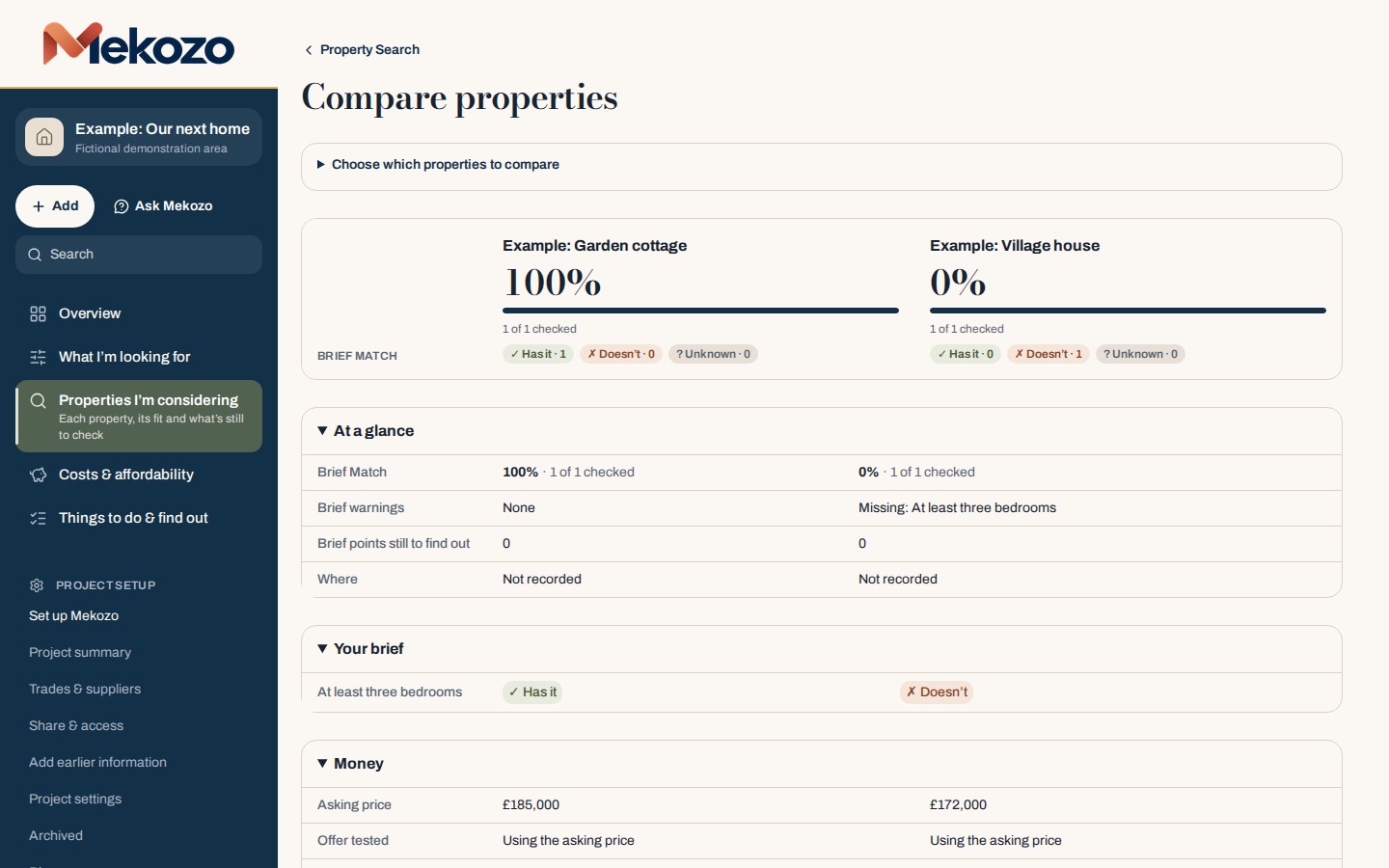
- Read the comparison from the top. Brief Match shows how many brief points each home meets, with counts for Has it, Doesn't and Unknown. At a glance, Your brief, Money and Viewings & concerns follow underneath.
- For any point marked unknown, add a question so you remember to find out before you decide.
Reading the result
A high Brief Match is a good sign, not a decision. A home that matches everything but costs more than your plan covers still needs thought. The Money section shows the asking price and the offer tested in the Offer Checker, and says when buying costs or work are not recorded yet, so a missing cost never looks like zero.
If a home does not meet a point now, you can say whether it could be changed with planned work. That potential is shown separately and never counts as met now.
Common mistakes
- Building the brief after the viewings. Write your must-haves first, or you will shape the brief around the house you liked.
- Making everything a must-have. If every point is essential, no home will match. Keep must-haves to what you would not buy without.
- Treating unknown as a yes. Unknown means you have not checked yet. Turn it into a question for the agent or seller.
- Making a new project for each house. Keep every candidate in one search project so they can be compared.
- Comparing only the asking price. Add buying costs and planned work so the comparison reflects the whole cost.
For the method behind this, read How to compare houses you have viewed.
Questions people ask
How many properties can I compare at once?
Tick as many of the properties you are considering as you like, then choose Compare selected. You need at least two.
Can my partner add their own viewing notes?
Yes. Invite them to the search project from Share & access. People you invite join free, and their notes sit with the same properties.
What happens to a property I rule out?
Choose I'm no longer considering this property. It moves to Previously considered with its notes kept, and you can consider it again later.
Bring the whole picture home.
Budgets, quotes, payments, documents and decisions in one place
30 days free. No card needed.
Monthly, with no annual plan. The Terms of membership set out the details.