

Compare quotes on more than price
Record what each quote includes, excludes and assumes, compare them side by side on the same job, then accept the one you choose. Every quote stays as history.
What the Quotes screen does
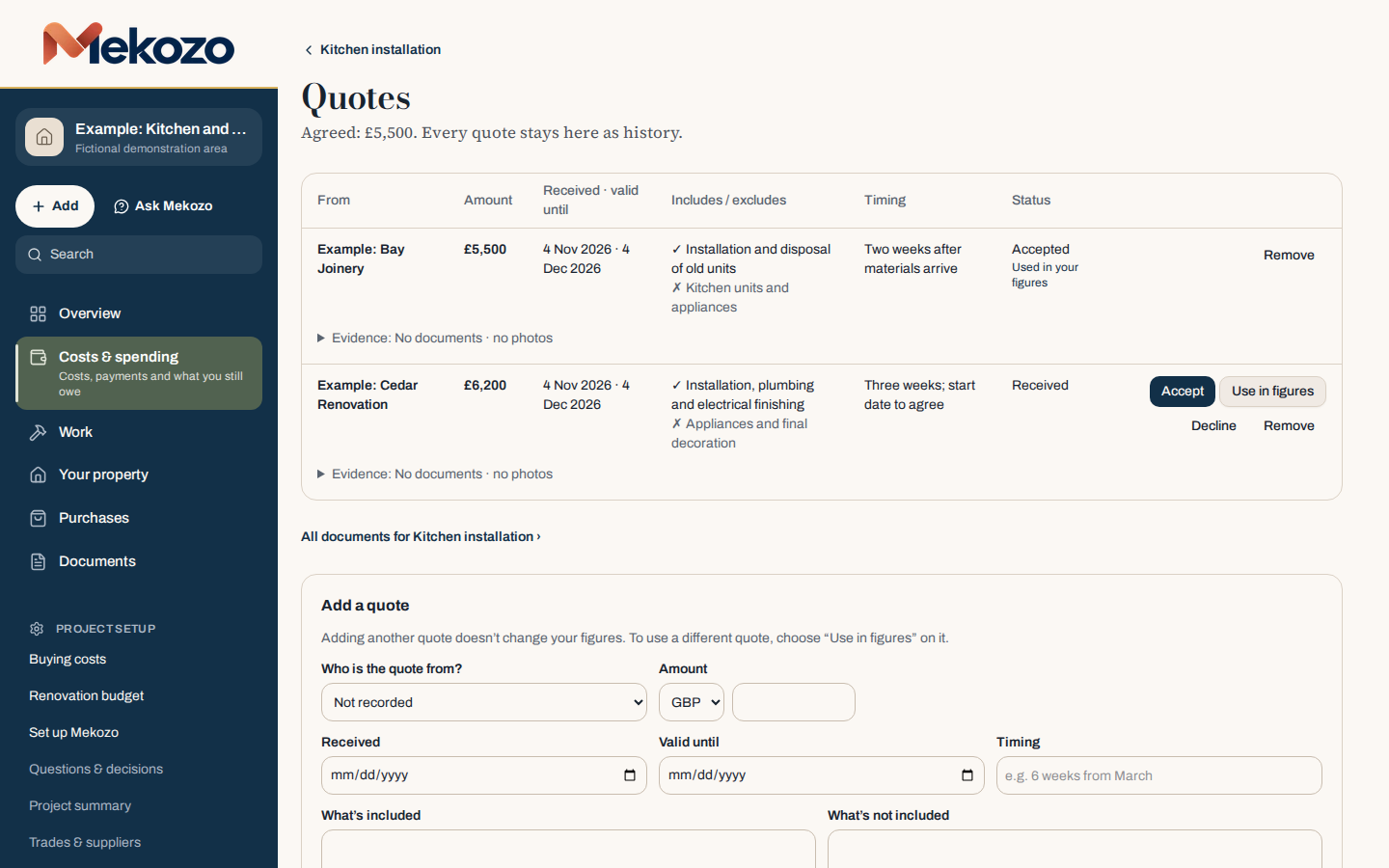
Two quotes for the same kitchen can differ by hundreds of pounds and still not be for the same job. One includes plumbing and decoration; the other leaves them out. The Quotes screen in Mekozo puts every quote for one piece of work in a table, with who it is from, the amount, when it was received and how long it is valid, what it includes and excludes, the timing and its status. You compare like with like, then accept one.
Accepting a quote records the agreed amount. The other quotes stay on the screen as history, so you can see later what you chose and why.
Before you start
Write down the job first: what needs doing and which rooms it affects. Send the same description to each contractor. A shared scope is what makes quotes comparable.
Step by step
- Open the piece of work, or add it with + Add, then Work.
- Choose Add and compare quotes.
- Under Add a quote, choose who it is from. If they are new, add them as a supplier or contact.
- Enter the amount, the date received and the date it is valid until.
- Fill in What's included and What's not included from the quote document, line by line. Add the timing, for example "six weeks from March".
- Add the quote document itself with Add a document to this quote, so the evidence sits with the figures.
- Repeat for each quote. Adding another quote does not change your figures.
- Compare the rows. Look at the includes and excludes before the amounts, and note anything you need to ask about.
- When you have decided, choose Accept on your chosen quote. If you want a different quote in your planning figures before you decide, choose Use in figures on it. Choose Decline for a quote you will not take.
Reading the table
The status column tells you where each quote stands: Received, Accepted, Declined or No longer valid. Used in your figures shows which quote your budget is counting. The heading above the table shows the agreed price once you have accepted a quote.
A higher quote that includes more work may cost less in the end than a lower one that leaves items out. Price the excluded work before you compare totals.
Common mistakes
- Comparing totals only. Read the includes and excludes first. A missing item has to be paid for somewhere.
- Sending each contractor a different brief. Use the same written scope for everyone.
- Ignoring the valid until date. A quote can lapse while you decide. Ask for it to be renewed in writing.
- Accepting before asking. Ask about materials, waste removal, timing and payment stages before you accept.
- Deleting the quotes you did not choose. Keep them. They help when the price or scope changes later.
Mekozo helps you compare the information. It does not check a contractor, judge a fair price or give legal advice; confirm local requirements with a qualified adviser.
For the method behind this, read What a good builder's quote includes, line by line.
Questions people ask
Does adding a quote change my budget?
No. The first quote you add is used in your figures until you choose another. Adding more quotes changes nothing until you choose Use in figures or Accept.
Can Mekozo read a quote for me?
Ask Mekozo can read a quote document and help you pick out what it includes. Check its reading against the document, because it can be wrong.
What if the price changes after I accept?
Open the cost and record the new agreed price. The original price stays in the history, so you can see what changed and when.
Bring the whole picture home.
Budgets, quotes, payments, documents and decisions in one place
30 days free. No card needed.
Monthly, with no annual plan. The Terms of membership set out the details.